Your personal deal radar is here!
Cheap Business Class deals disappear fast, and now you can hear about them the moment they appear.
Our Deal Alert Bell turns Premium-Flights into a personalized early-warning system.
Instead of checking the site repeatedly, you simply tell us:
- Where you want to fly from
- Where you want to fly to
- Your maximum price for a Business Class return
Whenever a new deal matches your exact criteria, you receive a browser notification within seconds, even if the site is closed.
No guesswork. No spam. Just real deals that fit your settings.
Important note for iPhone & iPad users: iOS supports deal alerts when Premium-Flights.com is added to the Home Screen.
For the best experience:
- Open this page in Safari
- Tap Share → “Add to Home Screen”
- Open Premium-Flights.com from the Home Screen icon
Push alerts are supported on recent iOS versions (16.4+). Availability depends on browser and device support.
How the alerts work
Every day we publish hand-checked Business and First Class deals, including flash sales, promo fares, and premium cabin discounts.
The bell makes those deals personal:
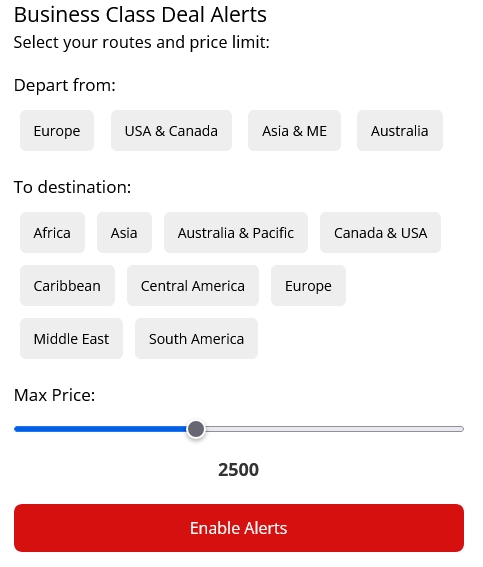
- Select one departure region (Europe, USA/Canada, Asia & Middle East, Australia)
- Select one or more destination regions (Asia, Africa, South America, etc.)
- Set your maximum price
If a new deal fulfills all your conditions, your browser sends you a notification instantly.
How to activate alerts (takes 15 seconds)
- Click the red floating bell (top left on desktop or mobile)
- Choose your departure region (e.g. Europe)
- Choose your destination region(s) (e.g. Asia + South America)
- Set your maximum price (e.g. 1900 round-trip)
- Click “Enable Alerts” and allow notifications when your browser asks
That’s it. From now on, you will only be notified when a deal truly matches what you are looking for.
Frequently asked questions
“I subscribed, but I’m not receiving anything, why?”
Most likely an ad-blocker (uBlock, AdGuard, Brave shields, etc.) is blocking notifications.
Whitelist premium-flights.com or temporarily disable the blocker and try again.
“Will I get spammed?”
No. You only receive alerts for deals that match your chosen routes and stay below your price limit.
Some days there are no alerts, and on busy days you may get a few excellent offers.
“Does this work on mobile?”
Yes. It works on Android (Chrome, Firefox, Samsung Internet) and on iPhone/iPad (Safari on iOS 16.4+).
The first time you subscribe, tap Allow when prompted.
“Can I change my preferences later?”
At the moment, preferences cannot be edited directly once they are saved. If you want to select new preferences, you can clear your browser data for Premium-Flights.com, which will reset your current settings and allow you to subscribe again with different options.
We are actively working on adding a simple reset and unsubscribe button to make this process easier in the future.
Ready to catch cheaper Business Class flights?
Click the red bell and let the deals find you, instead of the other way around.
– The Premium-Flights.com Team
Did this deal help you? ☕
Premium-Flights is free to use. If we helped you find a great Business or First Class deal, you can support our deal hunting.
How can i enable alerts and notifications i cant seem to set it up. When i chatgbt it it says login but not seeing that either
There is no login and it is not needed, it is all explained in the post:
Click the red floating bell (top right on desktop or mobile)
Choose your departure region (e.g. Europe)
Choose your destination region(s) (e.g. Asia + South America)
Set your maximum price (e.g. 1900 round-trip)
Click “Enable Alerts” and allow notifications when your browser asks
Usually we publish each day 3 deals from Europe, 1-2 deals from USA or Canada and 1 deal from Asia or Australia, so when you select something like from Europe to Carribean, you will get a notification when we publish such a deal. If we publish in the next weeks only deals to other destinations, you won’t get a notification in your webbrowser.
But it is possible that we have already posted a deal to the Caribbean that is still active, in that case you don’t get the notification.
Therefore, we recommend to use first our search engine, if you find no deal, use the notification tool.
For deals right into your mailbox, use our newsletter.
I hope this helps..